A frozen display during a quarterly earnings call. A microphone cutting out while the CEO pitches a major client. These aren't just minor technical hiccups. They are expensive disruptions that stall projects and damage professional credibility. The global AV market is projected to reach $325 billion by 2027, according to XTEN-AV, and companies are investing heavily in this infrastructure. Yet, many organizations still wait for equipment to break before they call a technician.
Waiting is a costly mistake. Replacement and emergency repairs consume time and budgets. Preventive maintenance is the alternative: a scheduled plan of regular inspections, firmware updates, cleaning, and testing designed to prevent system failures before they happen. By following strict audio visual equipment maintenance best practices, businesses can ensure reliable performance and avoid embarrassing disruptions during critical presentations.
AV stands for audio-visual. In a corporate setting, it refers to the integrated hardware and software systems used to facilitate communication, presentations, and video conferencing. This encompasses everything from displays and speakers to the complex networking infrastructure that connects them.
A standard corporate meeting room relies on several distinct components working in unison. Displays—whether flat panels or LED video walls—serve as the primary visual output. Audio systems, including ceiling-mounted microphones, DSPs (digital signal processors), and speakers, handle voice capture and distribution.
Video conferencing systems bridge the gap between remote and in-office staff, relying on codecs and cameras to transmit data. According to RYGID AV, all-in-one conference room kits from brands like Logitech and Shure work well in the right environments, but custom-built systems offer tailored acoustics and video scaling for larger, more complex spaces. The control system, often a touch panel on the conference table, ties these elements together, sending commands to lower screens, adjust lighting, and route audio.
Hardware is the physical equipment you can touch. Software is the code that tells that equipment what to do. The two are deeply intertwined.
Hardware degrades physically. Dust builds up on display vents, cables loosen from their ports, and projector lamps dim over time. Software degrades differently. It becomes obsolete. Codec manufacturers release new firmware to patch security vulnerabilities and improve video compression. According to Tempest Technologies, keeping firmware current is a simple practice that goes a long way in preventing downtime. If you update your hardware drivers but ignore the underlying operating system, your video conferencing system will eventually crash. Hardware requires physical cleaning. Software requires systematic patching.
Proactive audiovisual maintenance is essential because it catches minor issues before they escalate into costly failures, ensuring smooth operation during key events. By scheduling regular inspections and repairs, businesses extend the life of their technology, minimize downtime, and uphold high communication standards without relying on emergency interventions.
Reactive maintenance is expensive. You pay for emergency labor rates, expedited shipping on replacement parts, and the hidden cost of lost productivity while the room sits dark. According to Pentegra Systems, a minor unchecked issue can become a big problem that may shut down your audiovisual system entirely.
Proactive maintenance shifts these costs. You pay for predictable, scheduled upkeep. Corporate Audio Visual Services notes that scheduled, predictable upkeep is far more budget-friendly than unplanned system replacements or troubleshooting. Think of it like an automobile. You change the oil to protect the engine. You do not wait for the engine to seize before you check the fluid levels.
When a meeting room fails, the entire schedule derails. Executives cannot focus on the business at hand if they are worrying about the technology failing. According to Pentegra Systems, professional maintenance allows your team to focus on your business without concerns about your AV technology slowing them down.
The damage extends beyond internal frustration. Imagine hosting a large conference showcasing your services to current and potential clients, and the speakers suddenly turn to static. Corporate Audio Visual Services points out that this avoidable situation makes it harder to convince your audience that you offer top-quality services. Downtime during a client-facing presentation costs you business. It compromises your professional image and causes frustration among team members who rely on that technology to do their jobs.
Preventive maintenance follows a fixed, time-based schedule to service equipment before issues occur. Predictive maintenance uses real-time data and system monitoring to predict when a failure is likely to happen, triggering interventions only when necessary. Preventive is routine. Predictive is analytical.
A preventive maintenance schedule relies on regular, planned intervals. A technician visits the meeting rooms every month or every quarter, regardless of whether the equipment shows signs of failure. They check connections, clean filters, and test audio levels.
According to Infinite Audio Visual, a comprehensive preventative maintenance process begins with planning. You inventory the equipment, determine the specific maintenance tasks required for each device, and set a timeline. This methodical approach ensures that even the elements people do not use regularly get serviced. It guarantees that everything works together as it should when the next big presentation arrives.
Predictive maintenance takes a different approach. Instead of relying on a calendar, it relies on data. Sensors monitor system performance, tracking metrics like amplifier temperature, network latency, and bulb lumens. When the data indicates a component is operating outside of normal parameters, it flags the system for service.
This approach requires a higher level of integration. You need network-connected devices capable of reporting their own status. According to XTEN-AV, regular equipment inspections are vital, but leveraging system data to predict failures is the next step in maximizing equipment performance. Predictive maintenance stops a failing projector lamp from dropping mid-presentation by replacing it when the data shows it has reached 80% of its lifespan, rather than waiting for it to burn out on a random Tuesday.
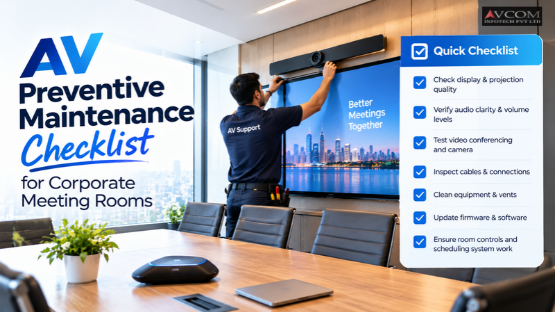
To maintain commercial AV systems effectively, businesses must perform daily visual inspections, conduct monthly hardware cleaning and cable management, and execute quarterly system diagnostics with firmware updates. This tiered approach catches immediate physical issues while keeping the underlying software infrastructure stable and secure.
Daily maintenance is fast. It takes five minutes.
Before the first meeting of the day, a designated staff member should walk the room. Check the displays for dead pixels or image retention. Verify that the microphones are positioned correctly and that no one has unplugged the primary HDMI cable to charge their laptop.
A room reset is equally important. At the end of the day, ensure the system powers down completely. Leaving displays on overnight burns out the backlights and wastes electricity. Check that the control panel is responsive. If the room has motorized shades, run them up and down to ensure the tracks are clear.
Monthly maintenance requires physical intervention. Dust is the enemy of AV equipment. It clogs projector filters, settles on camera lenses, and blocks the ventilation slots on amplifiers and codecs.
Cable management is a critical part of audio visual equipment maintenance best practices. Loose cables snag on chairs. Cables bent at sharp angles degrade signal quality. Secure loose wires with Velcro straps and replace any frayed connectors. According to Tempest Technologies, simple practices like checking for loose connections preserve the longevity and performance of your AV equipment.
Quarterly maintenance focuses on the software and the deep system diagnostics. This is where IT or an AV managed services provider takes over.
Update the firmware on all codecs, DSPs, and control systems. Manufacturer guidelines dictate the exact process, but according to XTEN-AV, scheduling these updates during periods of low system usage minimizes disruptions. Never update firmware ten minutes before a board meeting.
Run an audio diagnostic test. Play a 1kHz tone through the system and check for distortion or dead channels. Test the video conferencing system by placing a test call. Check the camera auto-framing and the speaker tracking. Verify that the network connection holds a stable bitrate. Finally, calibrate the displays. Colors shift over time. A quick calibration ensures the whites are white and the colors are accurate.
The best practices for audio visual equipment maintenance include maintaining optimal environmental conditions, documenting issues, tracking equipment lifecycles, and partnering with professional AV managed services. These practices protect the physical hardware, provide a clear operational history, and ensure expert oversight of complex systems.
AV equipment is sensitive to its surroundings. Heat kills electronics. If a server closet housing the AV rack hits 90 degrees, the amplifiers will shut down.
Keep the meeting room temperature stable, even when not in use. Humidity matters too. High humidity causes condensation on camera lenses and internal circuit boards. Low humidity creates static electricity, which can fry a control processor with a single touch. Ensure the room has adequate ventilation. Do not block the vents on a projector or a display.
You cannot manage what you do not track. Keep a log for every meeting room. When a user reports that the audio cuts out during screen sharing, write it down. Over time, this log reveals patterns. A recurring issue with a specific microphone might indicate a failing cable rather than a user error.
Track the lifecycles of the hardware. Projector lamps have an expected lifespan measured in hours. Displays lose brightness over time. By tracking the purchase date, the usage hours, and the repair history of each component, you can predict when a device needs replacement. According to Pentegra Systems, when a professional team monitors all components, they can identify and resolve issues immediately to ensure the system’s maximum life expectancy.
Internal IT teams are stretched thin. They manage networks, handle helpdesk tickets, and onboard new employees. AV maintenance often falls to the bottom of their priority list.
Partnering with a professional AV managed services provider shifts this burden. A customized service agreement delineates responsibilities and sets clear expectations for response times. Pentegra Systems notes that a well-drafted service agreement ensures clients receive the value promised by service providers. It acts as a benchmarking tool to assess performance.
A specialized provider brings trained technicians who understand the nuances of DSP programming and video conferencing codecs. They spot the warning signs that a generalist IT worker might miss.
Businesses can implement an AV preventive maintenance checklist by assigning clear room ownership to internal staff and scheduling regular testing for video conferencing systems. A successful rollout requires defining who is responsible for daily checks and who handles quarterly diagnostics.
Accountability drives results. If no one owns the room, no one maintains it.
Assign a room owner for each meeting space. This is often an administrative assistant or a department manager. Their job is the daily visual inspection and the room reset. They ensure the whiteboard markers have ink and the control panel is awake.
IT retains responsibility for the monthly and quarterly tasks. They handle the firmware updates, the network diagnostics, and the hardware replacements. Clear division of labor ensures the daily tasks do not overwhelm the IT department, while the technical tasks do not confuse the room owners.
Video conferencing is the most heavily used feature in modern corporate meeting rooms. It is also the most failure-prone. A simple cable test is not enough.
Schedule a weekly test call. Connect to a remote bridge and verify two-way audio and video. Test the content sharing. If the room uses a USB conference camera, plug a laptop into the designated HDMI port and share a presentation. This confirms the capture card is functioning.
According to Infinite Audio Visual, proactive maintenance saves time, money, and headaches. By the time a user walks into the room, the system is ready. There are no surprises. There is no scrambling to find a workaround while ten people wait in silence.
Protecting your corporate meeting rooms requires a proactive approach. When you are ready to implement a professional maintenance strategy, AVCOM infotech provides the expertise needed to keep your systems running smoothly. From audio visual collaboration solutions to comprehensive managed services, our team ensures your technology performs when it matters most. Contact AVCOM infotech today to build your customized maintenance plan. You can also connect with us on Facebook, Instagram, and LinkedIn.
| Maintenance Frequency | Core Tasks | Primary Focus |
|---|---|---|
| Daily | Visual inspections, room resets, power downs | Catch immediate physical issues |
| Monthly | Hardware cleaning, dusting vents, cable management | Protect physical hardware integrity |
| Quarterly | Firmware updates, system diagnostics, display calibration | Keep software stable and secure |
| Ongoing | Documenting issues, tracking lifecycles, environment control | Sustain optimal operating conditions |
An AV preventive maintenance checklist includes daily visual inspections, monthly hardware cleaning, and quarterly firmware updates. It covers cable management, display calibration, and video conferencing tests. Following these steps ensures reliable performance and prevents costly disruptions during critical corporate presentations.
AV stands for audio-visual. In a corporate environment, it refers to the integrated hardware and software systems used for communication and presentations. This includes displays, speakers, microphones, video conferencing codecs, networking infrastructure, and control systems that facilitate meetings.
Preventive maintenance follows a fixed, time-based schedule to service equipment before issues occur. Predictive maintenance uses real-time data and system monitoring to forecast failures. While preventive care is routine, predictive maintenance relies on analytics to trigger interventions only when necessary.
You should perform audio visual equipment maintenance on a tiered schedule. Conduct daily visual inspections and room resets, perform monthly hardware cleaning and cable management, and execute quarterly system diagnostics with firmware updates to keep commercial AV systems running smoothly.
Maintain commercial AV systems by assigning room owners for daily checks and IT for technical tasks. Schedule regular video conferencing test calls, control environmental conditions, document issues, and partner with professional AV managed services to ensure expert oversight and prevent downtime.