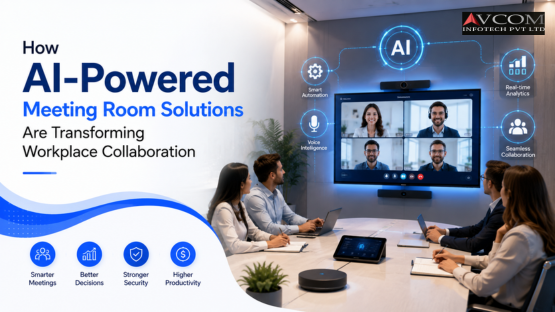
Walk into a modern meeting room in 2026, and the experience can be very different from the traditional conference room. Instead of spending the first few minutes adjusting cameras, searching for the right microphone, or asking someone to share a screen, intelligent workplace technology can handle much of the setup automatically. This is where AI-Powered Meeting Room Solutions are changing the way businesses collaborate.
Artificial intelligence is increasingly being used in cameras, microphones, room controls, meeting platforms, displays, and collaboration systems. The goal isn't simply to add AI to a meeting room. The real goal is to make meetings more natural, productive, and inclusive for people sitting both inside and outside the room.
For businesses in India and around the world, this shift is particularly relevant as hybrid work continues to bring together employees working from offices, homes, and different cities. Let's look at how AI is changing meeting rooms in 2026, what technologies businesses should consider, and how to build a smarter collaboration environment.
AI-Powered Meeting Room Solutions combine artificial intelligence with audio-visual and collaboration technologies to automate and improve the meeting experience.
These solutions can include:
The idea is simple: technology should take care of repetitive technical tasks so people can focus on the actual conversation.
Traditional meeting rooms often require users to manually control several devices.
Someone needs to:
For experienced users, this may take only a few seconds. For everyone else, it can become frustrating.
AI can reduce this friction.
A smart room can recognize meeting conditions, automatically adjust camera framing, optimize audio, and assist with other repetitive tasks.
The result is a meeting experience that feels less like operating equipment and more like simply having a conversation.
Businesses are looking for technology that delivers measurable improvements rather than impressive specifications.
AI-Powered Meeting Room Solutions for Businesses can help organizations improve:
Intelligent cameras and audio processing can make remote participants feel more connected.
Employees spend less time troubleshooting meeting-room technology.
AI can help ensure that remote participants are not forgotten during in-room discussions.
Automated room functions can reduce the amount of manual intervention required from employees or IT teams.
Organizations with multiple meeting rooms can standardize technology and management across locations.
One of the most visible applications of AI in meeting rooms is camera intelligence.
AI camera auto-tracking for video conferencing in India can automatically identify people in a room and adjust the camera view.
Depending on the camera and software, features may include:
Imagine a meeting where three people are sitting at one end of a large table.
Instead of showing a wide shot where everyone appears small, an intelligent camera can frame the participants more appropriately.
Now imagine someone standing up to present.
The camera may follow the presenter automatically, depending on the system's capabilities and configuration.
This can make hybrid meetings feel much more natural.
In a physical meeting, people naturally turn toward whoever is speaking. Remote participants don't have that advantage. A fixed camera may continue showing the entire room even when only one person is speaking.
AI-enabled cameras can help solve this problem by adjusting the view based on people and activity. This creates a more engaging experience for remote participants. However, camera tracking should be carefully configured. Overly aggressive tracking can become distracting, so businesses should choose systems that provide appropriate control over framing and tracking behaviour.
There is no single product that is automatically the Best AI-enabled meeting room solutions for corporate offices.
The right solution depends on:
A compact AI-enabled camera, microphone, display, and collaboration system may be sufficient.
Businesses may require intelligent cameras, ceiling or table microphones, larger displays, and integrated room control.
Large rooms may require multiple cameras, advanced audio processing, multiple displays, tracking capabilities, and centralized control.
The important thing is to design the solution around how the room is actually used.
AI can do more than control cameras. Smart AI automation for hybrid team collaboration can connect different elements of the meeting environment. For example, a meeting room may automatically:
This reduces the number of steps employees need to perform manually. The concept is similar to a smart home. You don't want to control every light individually when automation can handle routine actions. A smart meeting room follows the same principle.
Hybrid collaboration has one major challenge: making remote employees feel like equal participants. Someone sitting in the office has access to natural conversations, gestures, whiteboards, and informal interactions.
Someone joining remotely may see only a wide camera shot and hear inconsistent audio. AI-powered collaboration solutions for hybrid teams can help close this gap.
AI can assist with:
These capabilities can help create a more balanced experience between people in the room and those joining remotely.
Great video cannot compensate for poor audio. If a remote participant repeatedly says, “Can you hear me?”, the meeting experience quickly becomes frustrating. AI-powered audio processing can help address common problems such as:
Modern systems can use intelligent audio processing to improve speech clarity and reduce unwanted sounds. For large conference rooms, microphone placement remains important. AI cannot completely compensate for poor room acoustics or badly positioned equipment. Good design still comes first.
Another important development is AI-assisted meeting documentation. Instead of relying entirely on someone to take notes, AI-enabled meeting platforms may provide:
This can save time after meetings. However, businesses should consider privacy, consent, data retention, access permissions, and applicable organizational policies before enabling these features. AI should make documentation easier without creating unnecessary data-security risks.
AI can also make meeting rooms easier to operate. For example, a room automation system can combine:
The goal is to create a single experience. Instead of employees learning how to operate five different devices, they can use one simple interface. For businesses with many meeting rooms, standardized automation can also make IT support easier.
Time is one of the biggest benefits. Consider a company with 20 meeting rooms. If employees waste just a few minutes dealing with technical issues before meetings, the lost productivity can add up quickly. AI-powered systems can reduce some of this friction. Employees can spend more time:
The value of AI isn't always dramatic. Sometimes the biggest benefit is simply removing dozens of small frustrations every day.
AI-powered AV technology isn't limited to corporate headquarters.
Useful for hybrid development teams, project meetings, and remote collaboration.
Helpful for client presentations and distributed project teams.
Can support boardrooms, executive meetings, and secure collaboration environments.
Can assist with remote consultations and internal communication, subject to appropriate privacy and compliance requirements.
Can support hybrid classrooms, lectures, and remote learning.
AI-enabled cameras and audio systems can improve recording and remote participation.
The exact solution should always be designed around the organization's operational and security requirements.
AI isn't a magic button. There are several factors businesses should consider.
Cameras, microphones, transcriptions, and analytics can process sensitive information. Organizations should establish clear policies around data.
Connected meeting-room systems should be secured and maintained like other business technology. For a closer look at building a stronger security foundation across your network, see our guide on Zero Trust Network Security Solutions.
AI-enabled AV systems may depend on stable network connectivity.
The new system should work with existing collaboration platforms and AV equipment where possible.
Even an intelligent system needs basic user awareness.
The goal should be simple technology—not technology that creates another layer of complexity.
Before selecting equipment, start with your meeting requirements.
Understand what equipment you already have.
Are your rooms mainly used for internal meetings, client presentations, hybrid calls, training, or executive sessions?
Small huddle rooms require different solutions from large boardrooms.
Make sure the technology fits your existing software ecosystem.
Choose a solution that can scale as your workplace evolves.
AI-enabled AV systems need ongoing software, firmware, configuration, and hardware support.
Businesses planning modern meeting rooms can explore AV and collaboration solutions from AVCOM Infotech. AVCOM works in the audio-visual and collaboration space, helping organizations build workplace environments around their specific technology requirements.
If you're planning to upgrade meeting rooms or create an AI-ready collaboration environment, you can contact AVCOM Infotech to discuss the project requirements.
Businesses can also follow AVCOM Infotech on Facebook, Instagram, and LinkedIn.
The next generation of meeting rooms will likely become increasingly automated. We can expect more systems that can:
But technology should never become the centre of the meeting. The best AI meeting room is one where users barely notice the technology because everything simply works.
AI-Powered Meeting Room Solutions are transforming workplace collaboration by taking care of many technical tasks that once required manual intervention. From AI camera auto-tracking for video conferencing in India to intelligent audio, automated room controls, transcription, and smart collaboration features, AI is helping businesses create meeting environments that are easier to use and more inclusive for hybrid teams.
For companies looking for AI-Powered Meeting Room Solutions for Businesses, the priority should not be choosing the system with the longest list of AI features. Instead, focus on the actual meeting experience. Does it make collaboration easier? Does it improve communication? Does it work with your existing technology? Can your IT team manage it securely? Can it scale?
When those questions are answered properly, AI can become less of a buzzword and more of a genuinely useful workplace tool.
AI-Powered Meeting Room Solutions combine AI technology with cameras, microphones, displays, conferencing platforms, and room controls to automate and improve workplace meetings.
AI-enabled cameras can identify people and movement in a meeting room and automatically adjust framing or follow a speaker, depending on the camera's features and configuration.
Yes. AI-powered collaboration solutions for hybrid teams can improve framing, audio quality, meeting documentation, and interaction between remote and in-room participants.
Consider room size, meeting types, collaboration platforms, existing AV equipment, network infrastructure, security, privacy, scalability, and ongoing support.
In many cases, AI-enabled components can be integrated with existing AV equipment, but compatibility should be assessed before implementation.
Yes. AI technology can be used in small huddle rooms as well as large boardrooms. The solution should be scaled according to room size, users, and business requirements.