Modern businesses are generating more data, running more applications, and expecting their IT infrastructure to deliver faster performance with less complexity. Traditional data centers often depend on separate servers, storage systems, networking equipment, and management tools. While this model has worked for decades, managing all these components independently can become difficult as an organization grows.
This is where Hyperconverged Infrastructure (HCI) Solutions come into the picture.
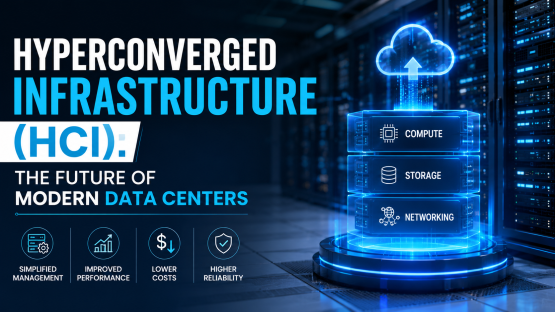
HCI brings computing, storage, networking, virtualization, and management into a more integrated infrastructure platform. Instead of managing multiple hardware silos, IT teams can manage many infrastructure functions through a centralized software-driven environment.
For businesses looking to modernize their data centers, simplify infrastructure management, and build a more scalable IT environment, HCI is becoming an increasingly important option.
Hyperconverged Infrastructure is an IT architecture that combines core data center resources into a unified, software-defined platform.
A traditional infrastructure environment may include:
HCI brings many of these functions together within a cluster of standardized nodes. Each node can provide computing and storage resources, while software manages the infrastructure as a unified environment.
In simple terms, think of traditional infrastructure as several separate departments working independently. HCI is more like creating one coordinated team with a shared management system.
At its core, HCI uses software to combine resources from multiple physical nodes. A typical HCI environment includes:
Processing resources run applications and virtual machines.
Storage resources are distributed across the infrastructure and presented as a shared storage environment.
The infrastructure connects workloads, users, applications, and storage resources.
Virtual machines and workloads can be created and managed through the HCI platform.
IT teams can manage the infrastructure through a unified interface.
The exact architecture varies between HCI platforms and vendors, so businesses should evaluate the technical design and compatibility before implementation.
IT environments are becoming more complex. Organizations may have:
Managing each infrastructure layer independently can require specialized skills and multiple management tools. HCI attempts to simplify this environment. Instead of asking IT teams to manage every component separately, the platform provides a more integrated way to operate infrastructure.
There are several potential hyperconverged infrastructure benefits that make this architecture attractive to businesses.
One of the biggest advantages is centralized management. IT teams can manage compute, storage, virtualization, and other infrastructure resources through a common management layer. This can reduce the number of separate systems administrators need to monitor.
Businesses rarely remain the same size. When workloads increase, organizations may need additional compute and storage capacity. HCI environments are generally designed around a scale-out model. Organizations can add nodes to increase available resources, depending on the platform's architecture and licensing model. This can make infrastructure expansion more predictable.
Traditional environments often involve multiple vendors, hardware platforms, management interfaces, and support agreements. HCI can reduce some of this complexity by integrating multiple infrastructure functions into a more standardized environment. Less complexity can also make troubleshooting easier.
Because compute and storage resources are managed as part of a unified environment, organizations may be able to use infrastructure resources more efficiently. Resource allocation can be adjusted based on workload requirements. However, actual utilization improvements depend on workload characteristics and how the HCI platform is configured.
Hyperconverged infrastructure for data centers is particularly relevant for organizations looking to modernize traditional server and storage environments through AVCOM's IT and technology services. A modern data center may need to support:
HCI can provide a standardized infrastructure layer for these workloads. For organizations with multiple data center environments, consistent HCI architecture can also help simplify deployment and management.
Understanding the difference between HCI and traditional infrastructure can help businesses determine whether the architecture is suitable.
| Traditional Infrastructure | Hyperconverged Infrastructure |
|---|---|
| Separate compute and storage | Integrated infrastructure nodes |
| Multiple management systems | Centralized management |
| Hardware silos | Software-defined architecture |
| Expansion may require separate components | Designed for scale-out expansion |
| More infrastructure layers to manage | More unified operational model |
| Separate specialist tools | Integrated management capabilities |
This doesn't mean traditional infrastructure is outdated or unsuitable. Large organizations may still use conventional architectures for workloads that require specialized storage, networking, or performance characteristics. HCI is another architectural option.
There is no universal answer to which are the best Hyperconverged Infrastructure Solutions. The right choice depends on the organization's workload, infrastructure, budget, technical requirements, and future plans. Businesses should evaluate:
Can the platform support your applications and expected workloads?
How easily can additional resources be added?
Is the administration interface easy for your IT team to use?
Can it work with existing virtualization, backup, security, and cloud environments?
What high-availability and resiliency capabilities are available?
Can the platform support your business continuity strategy?
What level of technical support and lifecycle management is available?
A solution that looks impressive on paper may not necessarily be the best fit for every organization.
Virtualization is one of the key technologies associated with HCI. Instead of running each application directly on physical servers, businesses can run multiple virtual machines on shared infrastructure resources. HCI platforms are typically designed to simplify the deployment and management of these virtualized workloads.
This can be useful for businesses running:
Virtualization also makes it easier to allocate infrastructure resources according to workload requirements.
Organizations with distributed employees may use virtual desktop infrastructure (VDI) to provide centrally managed desktops. HCI can be suitable for VDI environments because compute and storage resources can be managed through an integrated architecture.
For example, an organization could use an HCI cluster to support virtual desktops for employees across different departments. However, VDI workloads can be resource-intensive, so businesses should carefully evaluate CPU, memory, storage performance, network requirements, and user density before implementation.
Business continuity is another area where HCI can play an important role. If a critical application becomes unavailable, the organization needs a recovery strategy.
HCI platforms may support capabilities such as:
The exact capabilities depend on the platform. Businesses should not assume that HCI automatically provides complete disaster recovery. A proper DR strategy still requires planning, secondary infrastructure, backup policies, recovery objectives, and regular testing.
HCI and cloud computing can work together. Organizations may use HCI for private cloud environments while connecting them with public cloud services. This can support hybrid IT strategies where workloads are distributed according to business and technical requirements.
For example:
On-premises HCI:
Critical workloads or sensitive applications.
Public cloud:
Elastic workloads, cloud-native applications, or specific services.
Hybrid environment:
Workloads distributed between both environments.
The objective is flexibility.
Businesses searching for hyperconverged infrastructure providers in India should evaluate more than hardware specifications. For more context on how infrastructure is evolving, see AVCOM's article on IT infrastructure trends.
A provider or technology partner should understand:
Implementation experience matters because HCI affects multiple layers of the IT environment. A proper assessment should happen before recommending a platform.
Before choosing from different hyperconverged infrastructure providers in India, businesses can ask several practical questions:
An HCI deployment shouldn't ignore existing infrastructure.
Compute, storage, network, security, backup and management need to work together.
Infrastructure needs ongoing monitoring, maintenance, troubleshooting, and upgrades.
The infrastructure should support future business growth.
Look beyond initial hardware costs. Consider licensing, support, maintenance, power, cooling, and future expansion.
HCI simplifies infrastructure, but security remains essential.
Businesses should consider:
The HCI management layer itself should receive strong security protection because it can provide significant control over infrastructure resources.
HCI isn't limited to large enterprises. Small and medium businesses can consider HCI when they need to modernize their infrastructure but want to reduce the complexity of managing separate servers and storage systems.
Potential use cases include:
However, HCI isn't automatically the most cost-effective option for every SMB. A smaller organization with very limited workloads may find traditional servers or cloud services more appropriate. The decision should be based on actual requirements.
HCI offers several advantages, but businesses should also understand the potential challenges.
Some HCI environments can create stronger dependence on a particular platform or vendor ecosystem.
Software licensing can significantly influence the total cost.
Compute and storage requirements need to be carefully evaluated.
Moving workloads from traditional infrastructure to HCI requires planning.
IT teams may need training to manage the selected platform effectively. These challenges don't make HCI unsuitable. They simply highlight why proper planning matters.
A successful HCI project should start with assessment rather than hardware selection.
Document servers, storage, networking, workloads, applications, and dependencies.
Understand performance, availability, scalability, and recovery requirements.
Determine CPU, memory, storage, and network requirements.
Choose an HCI platform that matches the technical and business requirements.
Decide how existing workloads will move to the new environment.
Validate performance, failover, backup, security, and recovery processes.
After deployment, continuously review capacity and performance.
Organizations exploring infrastructure modernization can learn more about AVCOM Infotech's approach to data center and infrastructure projects. If your organization is evaluating data center modernization or infrastructure requirements, you can contact AVCOM Infotech to discuss your project.
You can also follow AVCOM Infotech through its official Facebook, Instagram, and LinkedIn channels.
HCI is not going to replace every traditional data center architecture. However, its software-defined approach, centralized management, and scale-out design make it an attractive option for organizations looking to simplify infrastructure.
As businesses continue adopting virtualization, private cloud, hybrid cloud, and software-defined technologies, HCI can become an important part of modern data center strategies.
The bigger trend is clear: data centers are moving away from isolated hardware systems toward integrated, software-driven infrastructure. HCI fits naturally into that transition.
Hyperconverged Infrastructure (HCI) Solutions provide businesses with a more integrated approach to computing, storage, networking, virtualization, and infrastructure management.The potential hyperconverged infrastructure benefits include simplified management, scalable architecture, reduced infrastructure complexity, improved operational efficiency, and support for modern virtualized workloads.
For businesses considering hyperconverged infrastructure for data centers, the most important step is to evaluate the architecture against actual workload, performance, scalability, security, availability, and budget requirements. Similarly, organizations comparing hyperconverged infrastructure providers in India should look beyond product specifications and consider implementation expertise, integration capabilities, technical support, and long-term infrastructure planning.
HCI may not be the right answer for every business. But for organizations seeking a simpler, scalable, and software-driven approach to modern infrastructure, it is certainly an architecture worth considering.
1. What is Hyperconverged Infrastructure (HCI)?
Hyperconverged Infrastructure combines computing, storage, networking, virtualization, and management capabilities into an integrated, software-defined infrastructure platform.
2. What are the main hyperconverged infrastructure benefits?
Key hyperconverged infrastructure benefits can include centralized management, simplified infrastructure, scale-out expansion, better operational efficiency, and support for virtualized workloads.
3. Is hyperconverged infrastructure suitable for data centers?
Yes. Hyperconverged infrastructure for data centers can support virtualized applications, databases, private cloud workloads, VDI, backup environments, and other enterprise workloads, depending on the platform and architecture.
4. How do businesses choose the best Hyperconverged Infrastructure Solutions?
Businesses should evaluate workload requirements, performance, scalability, virtualization support, availability, disaster recovery, security, integration, licensing, and total cost of ownership.
5. Are there hyperconverged infrastructure providers in India?
Yes. Businesses can find technology providers and infrastructure partners in India offering HCI-related consulting, integration, deployment, and support. Organizations should assess their technical capabilities and experience before selecting a partner.
6. Is HCI better than traditional infrastructure?
Not necessarily for every workload. HCI can simplify infrastructure management and scaling, but traditional architectures may still be better suited for certain specialized workloads. The right choice depends on the organization's technical and business requirements.